Vision Assist

Technology

From camera frame to spoken alert in a fraction of a second.

Vision Assist chains a fast object detector, distance and direction estimation, and a speech engine. Here’s exactly how it works — and you can try it yourself.

AI detection

Every object found, labelled and scored.

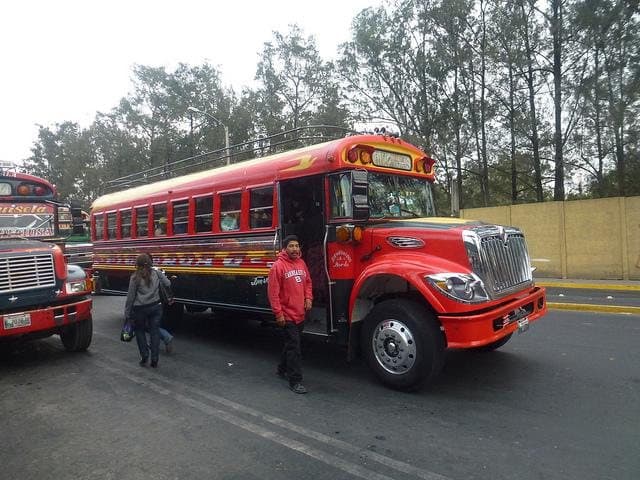
These are real results from the YOLOv8n model. Each box shows what the model thinks it sees and how confident it is, from 0 to 1.

A red painted bus parked at the roadside, with two people walking beside it.
Photo: COCO 2017 dataset (Flickr, Creative Commons). Boxes: YOLOv8n, unedited.

Spoken alert

“Caution. Bus ahead, close. Bus on your left, close. Person ahead, close.”

Spoken audio isn’t supported in this browser.

Detections

confidence
  • personon your left87% confidence
  • personahead87% confidence
  • busahead82% confidence
  • buson your left60% confidence

Voice assistance

From pixels to a few clear words.

Seeing a box on a screen doesn’t help if you can’t see the screen. Vision Assist turns each detection into a short spoken alert that says what it is and where.

  1. 01Detect

    car · 0.91 · centre

  2. 02Rank

    closest hazards first

  3. 03Phrase

    “Car ahead, close”

  4. 04Speak

    short, clear audio

Listen to example alerts

  • “Car ahead”

    Vehicle centred in the frameWorks now

    Spoken audio isn’t supported in this browser.
  • “Person on your left, close”

    Large box, left third of the frameWorks now

    Spoken audio isn’t supported in this browser.
  • “Bicycle on your right”

    Vehicle in the right thirdWorks now

    Spoken audio isn’t supported in this browser.
  • “Manhole detected”

    Ground-level hazardPlanned

    Spoken audio isn’t supported in this browser.
  • “Step down ahead”

    Change in ground heightPlanned

    Spoken audio isn’t supported in this browser.
  • “Pole on the left”

    Street furniturePlanned

    Spoken audio isn’t supported in this browser.

“Planned” alerts need the hazard-specific model that is still being trained.

How alerts are chosen

  • Where is it?

    The frame is split into left, ahead and right, so every alert includes a direction.

  • How close?

    Larger objects are usually closer. Close hazards are announced first and start with “Caution”.

  • What matters?

    Vehicles and people rank above street signs. Only the top three are spoken, to avoid overload.

  • Say it once

    Repeated objects are grouped — “3 people ahead” — and live mode waits before repeating an alert.

Loading the live demo…

Architecture

A simple pipeline, built on proven tools.

Vision Assist chains together a camera, a fast object detector and a speech engine. Each part can be improved or swapped on its own.

Training · offline

  1. Dataset

    COCO + street hazards

  2. PyTorch training

    Fine-tune YOLOv8

  3. ONNX export

    One model, many devices

Runtime · every frame

  1. Camera

    Phone camera or uploaded photo

  2. Pre-process

    Resize & letterbox to 640 px

  3. YOLOv8

    Boxes, labels, confidence

  4. Distance & direction

    Object size + depth estimation

  5. Alert engine

    Urgency, cooldowns, de-duplicate

  6. Text-to-speech

    Short spoken alert

Architecture. A model is trained once in PyTorch and exported to ONNX. At runtime each camera frame is resized and passed through YOLOv8. Each object gets a direction and an estimated distance, the alert engine decides how urgent it is, and the most important alerts are spoken. The prototype runs this loop in Python; this website runs the detection loop in your browser.
  • Python

    Prototype runtime

    Camera capture, model inference and alert logic in the research prototype.

  • YOLOv8

    Object detection

    A single-stage detector that finds and labels objects in one pass — fast enough for live video.

  • PyTorch

    Training framework

    Model training and fine-tuning, then export to ONNX for phones and browsers.

  • OpenCV

    Computer vision

    Camera capture, resizing and frame handling in the prototype, plus filtering of overlapping boxes.

  • MiDaS depth

    Distance estimation

    Estimates depth from a single camera image. Combined with typical object sizes to judge how far away things are.

  • Text-to-speech

    Voice output

    Turns ranked alerts into short spoken phrases, with urgent alerts able to interrupt. The web demo uses the browser’s voice.

  • ONNX Runtime Web

    In-browser inference

    Runs the same model on this page with WebAssembly. Your images never leave your device.

  • Next.js

    This website

    Accessible, fast pages with security headers, deployed on Vercel.

Roadmap

The path to live camera

The detector already accepts video frames, so the same code powers photos and the beta camera mode above.

  1. Camera input in the browser

    Available in beta

  2. Spoken alerts with repeat limits

    Available in beta

  3. GPU acceleration (WebGPU)

    Faster frames on newer phones

  4. Installable offline app

    Works without a connection

Model & data

Open about what works — and what doesn’t yet.

Here is the model, the data behind it, how it performs and where the project is heading. Results that haven’t been measured are clearly marked.

The model

In use

The current demo runs YOLOv8n, the smallest YOLOv8 model. It is small enough for phones and browsers, and is the starting point for the hazard model.

Input size
640 × 640
Parameters
3.2 M
Compute
8.7 GFLOPs
Classes
80 (COCO)
Web model size
≈ 12 MB
Format
PyTorch → ONNX

Validation metrics

Base model

Published by Ultralytics
mAP 50–95
37.3COCO val2017
CPU latency
80.4 msONNX, per image
GPU latency
0.99 msA100, TensorRT

mAP measures how well boxes match the real objects (higher is better). Source (opens in a new tab)

Vision Assist hazard model

Not yet measured

Per-class precision, recall and mAP will be published here once the model is tested on a held-out set of street images. We won’t show numbers we haven’t measured.

Dataset

Today: COCO 2017

The base model learned from about 118,000 everyday photos labelled with 80 kinds of object, including people, cars, buses, bicycles, traffic lights and benches.

Next: street hazard dataset

In progress

9,800 street images collected so far for training and testing.

  • Pole
  • Curb
  • Step / stairs
  • Manhole
  • Construction barrier
  • Low branch
  • Bollard
  1. 1.Collect street-level images at walking height, in daylight, dusk and rain.
  2. 2.Label hazards with bounding boxes, with a separate test set never used for training.
  3. 3.Fine-tune YOLOv8 from the COCO checkpoint so everyday objects are still recognised.
  4. 4.Publish precision, recall and mAP per class — including where the model struggles.

App design

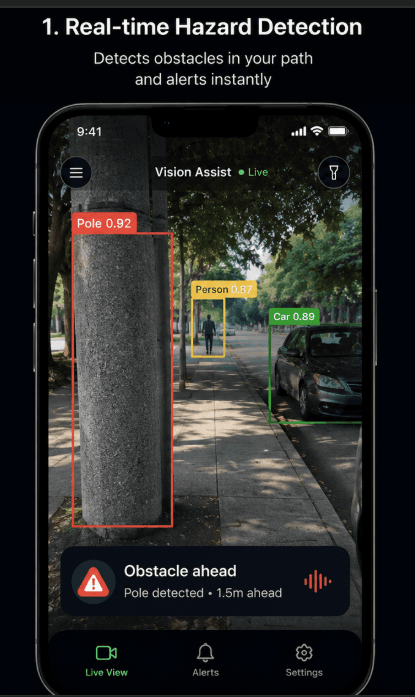
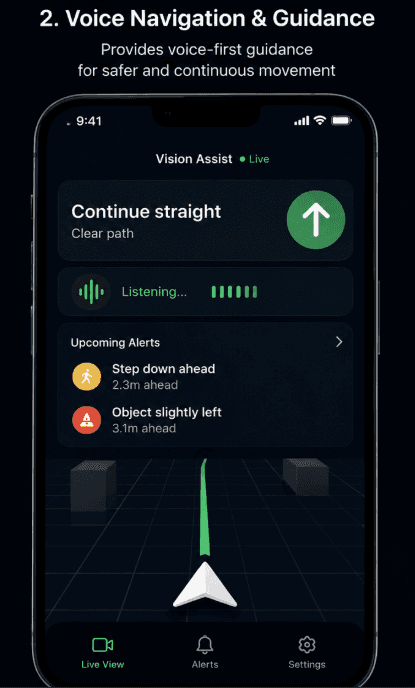
Design concepts for the next version of the phone app: a live hazard view and voice-led guidance.

  • Phone prototype showing a street with boxes around a pole, a person and a car, and an alert reading “Obstacle ahead — pole detected, 1.5 metres ahead”.
    Hazard detection view
  • Phone prototype showing “Continue straight — clear path”, a listening indicator, and upcoming alerts: step down ahead at 2.3 metres and object slightly left at 3.1 metres.
    Voice guidance view

Want to see it on a real street?

Join the pilot to try Vision Assist on your own routes, with support from the team.

Sign-ups go by email to the founder. Nothing is stored on this website.