
Hazards slip through
A cane finds what’s on the ground, but can miss overhead hazards and temporary barriers like chest-height construction signs.
Experimental AI prototype · Accessibility research
Vision Assist uses a phone camera and AI to spot what is around you — people, cars, bikes and more — and tells you out loud, so you can keep walking with more confidence.
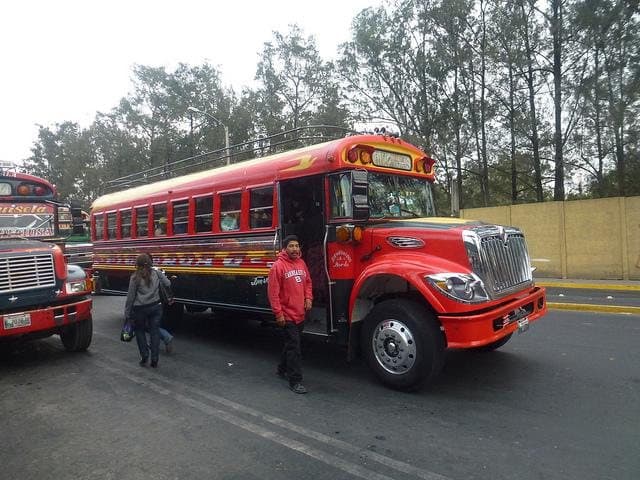
Spoken alert
“Caution. Bus ahead, close. Bus on your left, close. Person ahead, close.”
The problem
Through research, accessibility reports and conversations with potential users, the same issues came up again and again.
A cane finds what’s on the ground, but can miss overhead hazards and temporary barriers like chest-height construction signs.
Walking somewhere unfamiliar takes intense focus. Over a whole journey, that mental load becomes exhausting.
When every outing is hard work, people go out less often — which can lead to isolation and lost independence.
Navigation apps
Great at routes and arrival times.
They miss the last few metres: bollards, street furniture and temporary barriers.
Scene-description apps
Excellent at reading text and describing a scene.
You usually stop and take a photo, which breaks the flow of walking.
Wearable devices
Hands-free and powerful.
Often cost £500 or more and mean carrying extra gear.
The gap: continuous, walking-level hazard awareness — on the phone you already own.
How it works
Point the camera ahead, at chest height or on a lanyard. Start Vision Assist with your voice.
Every frame is checked for people, vehicles and obstacles, with their direction and rough distance.
Short spoken alerts — “Person at front left”, “Car right, 10 metres” — only when something matters.
What it does
Every feature is designed around one idea: tell people what matters, when it matters, without slowing them down.
No stopping to take photos. Vision Assist keeps watching and speaks up when something is in your way.
Alerts say where something is — left, ahead or right — and roughly how far, from object size and depth estimation.
Start it, ask for directions and hear alerts without looking at the screen. Works with screen readers.
Designed to add warnings your usual aid can’t give, like chest-height signs — not to replace it.
Runs on a standard modern smartphone. No glasses, sensors or subscriptions to start.
Video is processed on the device wherever possible. Camera footage is not uploaded or stored.
Real-world test
The app is started by voice, asked to navigate to the University of Bristol, and gives spoken directions and hazard alerts along the way. The phone screen on the right shows each alert as it is spoken.
In this one-minute walk through Bristol, Vision Assist is started by voice, asked for directions to the University of Bristol, and warns about what’s ahead on the way.
Live demo
Upload a street photo and hear what the model finds. It runs on your device — your image is never uploaded.

Who it’s for
Blind and partially sighted adults who use a smartphone and want more confidence on everyday walks.
Habilitation and rehabilitation specialists and sight-loss charities who can help shape and test it.
Organisations that want accessible campuses, stations and buildings for blind and partially sighted visitors.
Roadmap
From the founder
Through market research, accessibility reports and conversations with potential users, I found the same gap again and again: people want to know what is directly in their path while they keep walking — without buying expensive hardware.
 Sudha Rani MaddalaFounder, Vision Assist · MSc Data Science, University of Bristol
Questions
A smartphone app being developed to help blind and partially sighted people notice obstacles while walking. It uses the phone camera and AI to spot people, vehicles and obstacles, and tells you about them with short spoken alerts.
No. Vision Assist is designed to work alongside your usual mobility aid. It can warn about things a cane may miss, such as chest-height signs, but you should always keep using your cane or guide dog.
Not yet. Vision Assist is a working prototype. We are preparing a small pilot with blind and partially sighted users. You can join the pilot list on the Join page, and try the AI detection demo on this website now.
The goal is standard modern iPhone and Android phones, with no extra hardware. Supported models will be confirmed before the pilot.
Core hazard alerts are planned to be free. Optional premium features and licences for organisations will help fund development, and we will look for sponsorship so price is never the barrier.
We’re looking for blind and partially sighted people to try Vision Assist in a small, supported pilot — and organisations who want to help.
Sign-ups go by email to the founder. Nothing is stored on this website.